
Everything you need to run Mantra properly.
One page, no fluff. If a detail is missing here, it is in the README or DESIGN.md.
01Install
Linux or macOS. No sudo. Installs two binaries side by side — mantra and bija, its agent harness — verifies a sha256 for each, installs to ~/.local/bin, adds it to PATH, runs mantra doctor. Re-running upgrades. A release without a bija asset still installs mantra; a source build always brings both.
curl -fsSL https://raw.githubusercontent.com/sahelea1/mantra/master/install.sh | shwget · pin a version · build from source
wget -qO- https://raw.githubusercontent.com/sahelea1/mantra/master/install.sh | sh

MANTRA_VERSION=v0.7.0 sh -c "$(curl -fsSL https://raw.githubusercontent.com/sahelea1/mantra/master/install.sh)"
MANTRA_FROM_SOURCE=1  sh -c "$(curl -fsSL https://raw.githubusercontent.com/sahelea1/mantra/master/install.sh)"

cd mantra/mantra_src && cargo build --release && cp target/release/mantra target/release/bija ~/.local/bin/   # Rust ≥ 1.80; one build makes both
Backends: Bija is already there
Agents need a backend. bija ships with Mantra: set OPENAI_API_KEY and Solo runs on it (the built-in *-api models are the OpenAI API), or point it at any other OpenAI- or Anthropic-compatible provider — a local Ollama or vLLM needs no key. The official CLIs are optional:
export OPENAI_API_KEY=…npm i -g @openai/codex && codex loginnpm i -g @anthropic-ai/claude-code && claudePlus git for the isolated worktrees. When a CLI is present but unusable, mantra doctor names the file and the fix, not an errno.
A fresh install's Solo starts on sol-api — Bija on the OpenAI API. If Codex is already signed in with a ChatGPT subscription, Solo starts on sol and every role defaults to a model that account can actually run. On a machine without Codex, Solo and the default pattern move to their Bija twins for the session: sol → sol-api, mantra-default → mantra-default-bija.
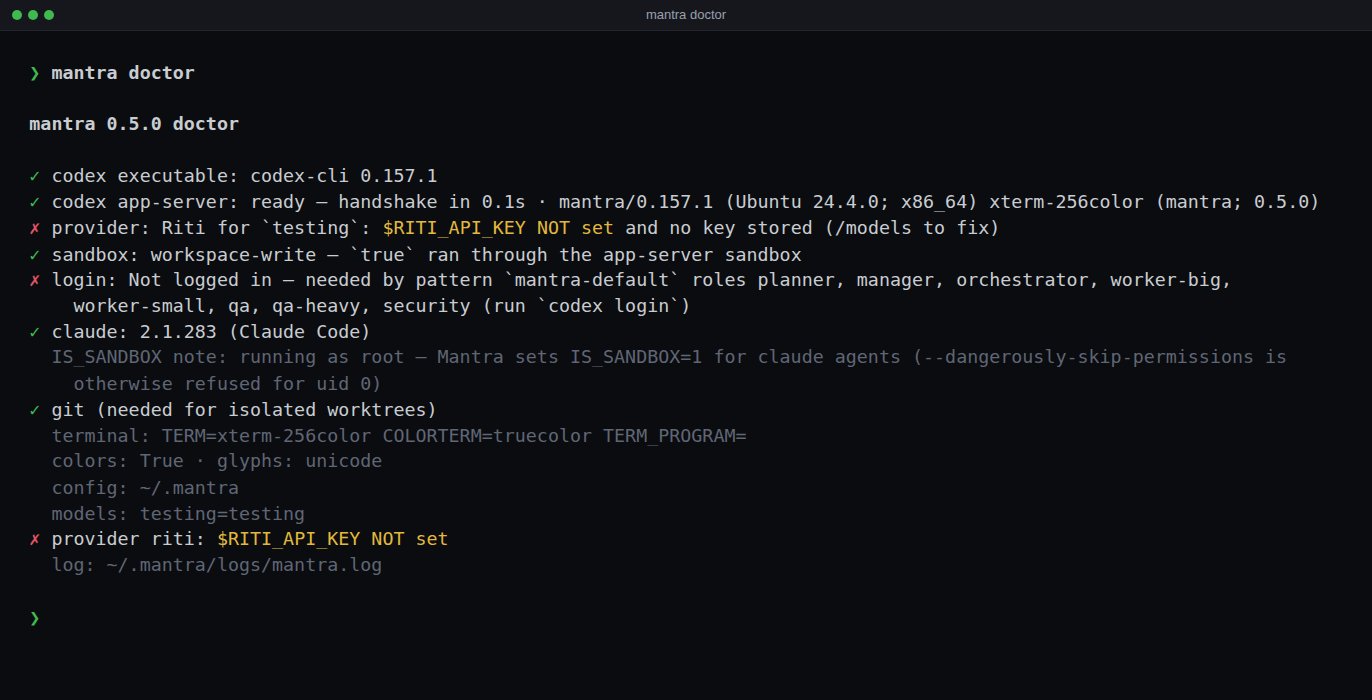
mantra doctor probes readiness, not presence — one row and verdict each, the readiness probes capped at 10 s (the --version checks at 5 s): the codex executable (--version); the app-server, launched exactly as an agent launches it and taken through the initialize handshake; the default model's provider — where its key comes from and whether the endpoint accepts it, via GET /models (no inference is ever sent, and a placeholder URL such as example.com gets no request at all); the sandbox — one true run through the configured sandbox policy on that app-server (codex sandbox -- true on servers without command/exec); which bija agents run (bija_command as configured, else the one beside mantra, else $MANTRA_BIJA) and its version; then codex login status (only a failure when something actually runs on Codex's own account), claude, git, the terminal, tmux, and each provider's key source (a Bija provider's URL and wire too). A failing row quotes Codex's own error line, exit code included. An agent that fails the same way at launch is halted after 3 attempts with that error.
02Quickstart
mantra --demo                                  # real UI, scripted agents, no API calls, no key, no cost
cd your-project && mantra                      # Solo, in this repo
mantra run "add OAuth login to the API"        # straight into a team run
mantra --swarm 16 "port the tests to pytest"   # many small workers, 16 at once
mantra runs                                    # every run: resume or delete
mantra doctor                                  # what's ready, what's missing (probes, not a PATH check)
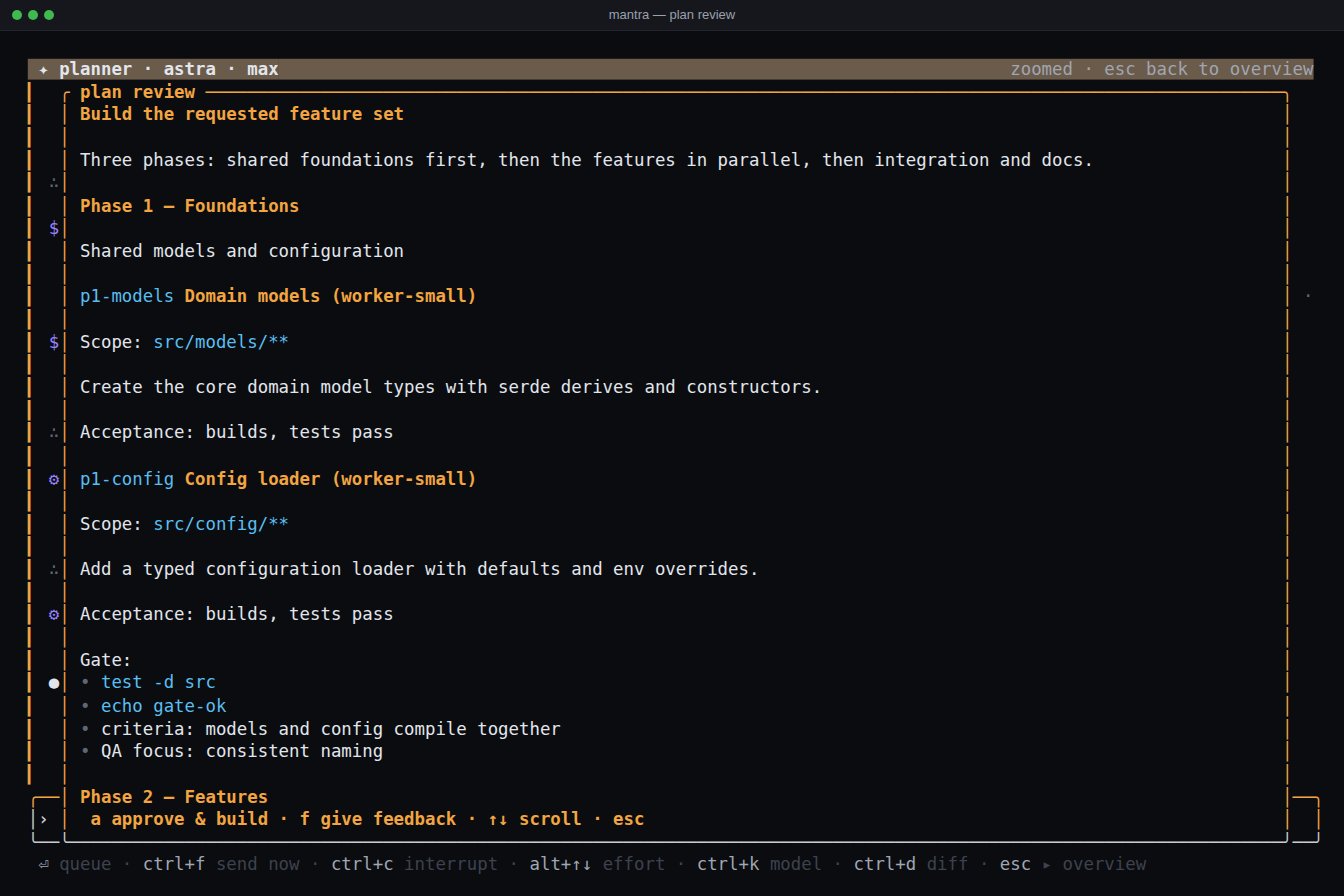
Inside the app: ctrl+o switches Solo ⇄ Mandala. In Mandala, type a goal — the planner takes it from there. p reviews the plan, a approves it, /land merges the finished run branch into yours.
03Solo
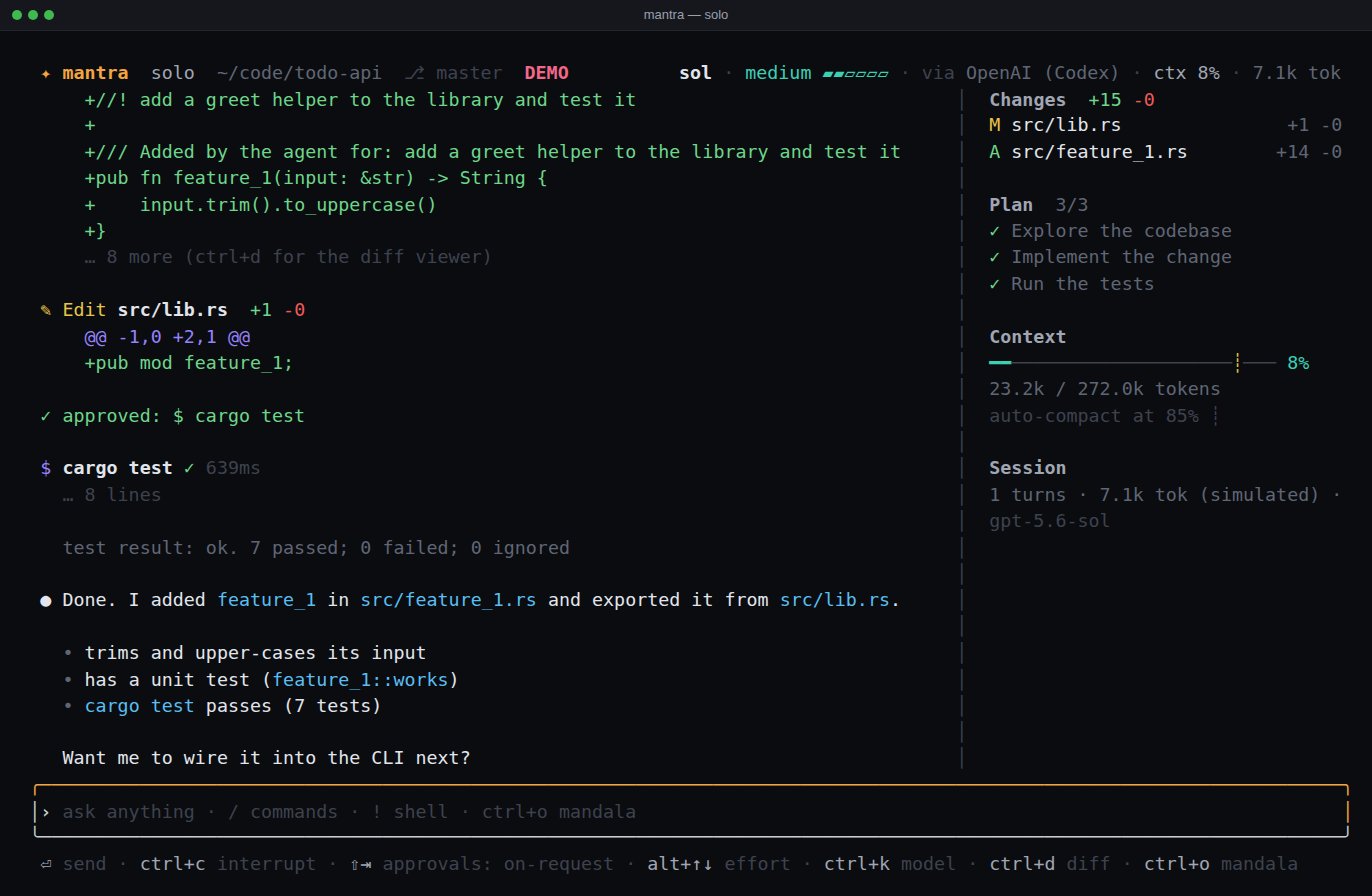
One agent with everything on screen: the diff it is writing (ctrl+d for the full viewer), its plan ticked live, a context gauge with the auto-compaction threshold marked, the command running right now. Model and provider always in the header.
- ›Type while it works.
⏎queues your message behind the running turn;ctrl+fshoves it in right now;ctrl+xdiscards the queue. - ›Approvals.
shift+tabcycles untrusted → on-request → never ask. Never-ask auto-approves and logs it; the sandbox still applies. - ›Shell.
!cmdruns a command./compactcompacts by hand. - ›Backend and tools. Solo starts on Bija (
sol-api);ctrl+kpicks any Codex, Claude Code or Bija model. It gets every enabled MCP server by default —/mcpshows which.
04Mandala — a run, step by step
- 1The planner writes a phased plan; you approve it. Phases run in order; tasks inside a phase run in parallel with declared file scopes. Validated before you see it — unique ids, known roles, no overlapping scopes. An empty project skips the exploration step.
- 2The orchestrator runs the phase. Spawns each worker into its own git worktree, then sleeps until something happens — finished, failed, stalled, out of scope, asked a question. Above it, the manager watches the whole run.
- 3The gate merges, checks and reviews — and never fixes. Worker branches are merged, the phase's shell checks run, and a fresh, read-only QA agent starts from the check results and the phase's diff. On a fail its report is a work order, and Mantra routes the fix itself: a
fix-<round>worker scoped to the files the findings name, then the checks and a new QA round, up togate_max_rounds. A gate that keeps failing goes to the manager, then the planner — before it ever stops for you. Whatever the checks leave behind (__pycache__, build scratch, a formatter's edits) is dropped before the phase commit — never committed, never landed. - 4The finale depends on the pattern. In
mantra-default: one QA pass that starts from the run's diff and the gate reports — security is a checklist inside it — then the planner verifying its own plan against the same diff; both can spawn fix workers for real gaps. - 5
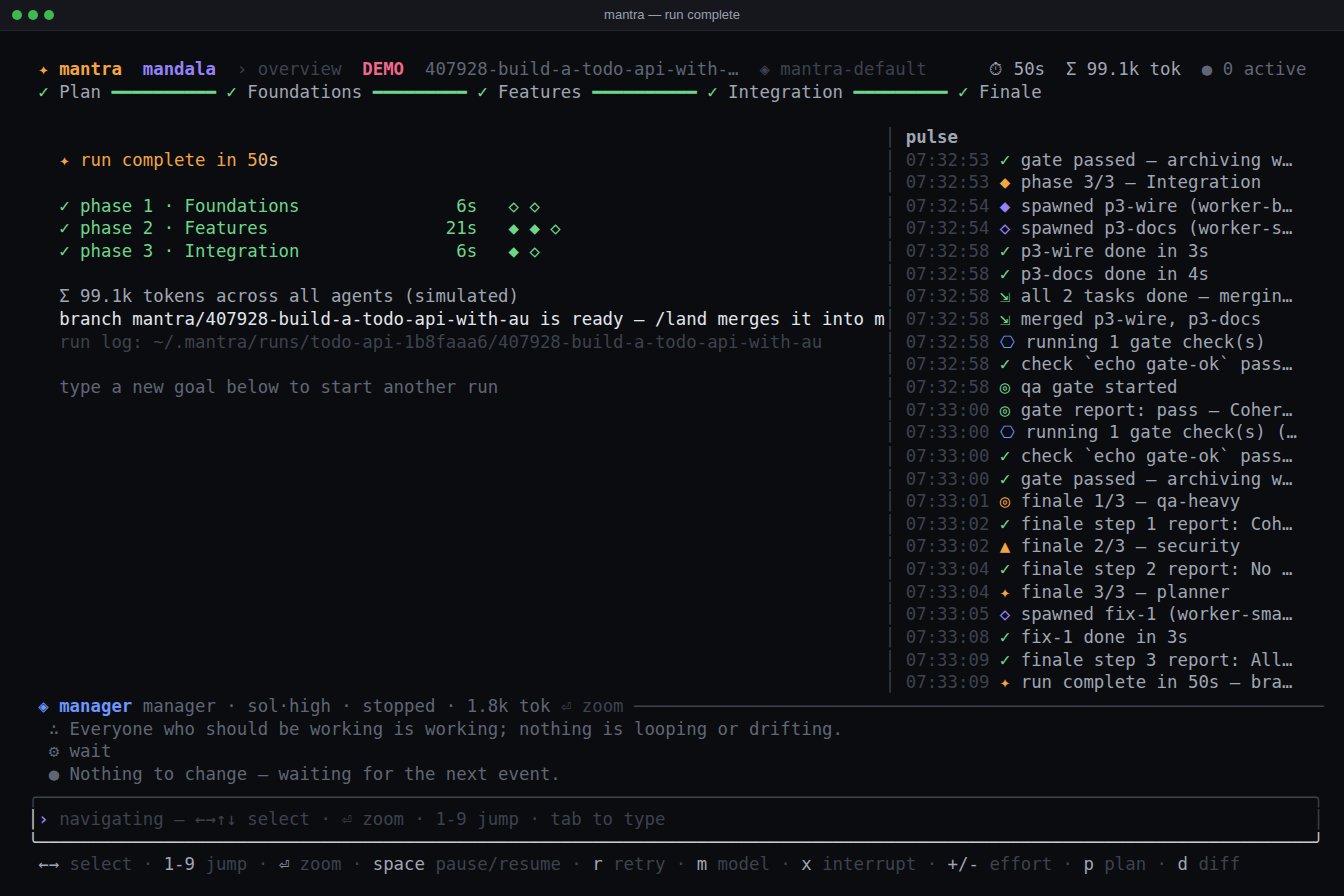
/landmerges the run branch into yours. Everything else lives in~/.mantra. Nothing is written into your project.
Zoom into any agent — it is just Solo again. ⏎ zooms, 1–9 jump, esc goes back. Plain text re-prompts the planner; @p2-api use axum messages one worker directly. Token counts are the backend's running totals; where most of it was served from the cache, the card, the zoom header and the run's Σ add · 5.9M cached. A finished card names the model its attempt actually ran on.
Swarms: --swarm N
mantra-swarm is mantra-default-bija — every role on Bija — cut for a fan-out: the planner is told to split the work into many small tasks with disjoint scopes, up to 32 a phase, and the orchestrator to keep up to max_parallel (8) of them running at once.
mantra --swarm 16 "port the tests to pytest"   # mantra-swarm, 16 workers at once
mantra run --parallel 8 "<goal>"               # any pattern, 8 at once, this run only
/swarm 16 <goal>                               # the same, from inside the app
How many at once is per run: --swarm N is --pattern mantra-swarm --parallel N. N (1–128) goes into the run's own copy of the pattern — which a resume reads back — never into the saved one, with room for N tasks a phase when the pattern allows fewer, and the planner and orchestrator are told the run's number. Workers on Bija are small processes (32 of them are about 150 MB), so past 32 it is the provider's rate limits that bind, and the run's journal says so.
Akasha: shared notes for agent groups EXPERIMENTAL
Ākāśa is the space that holds everything. Agents in a group share one small block of notes: a fact about the codebase, a decision, an interface one of them created, a pitfall. Each agent keeps its own context and its own reasoning; the block is the part it chooses to share, plus what Mantra shares for it (a task done or failed, the files it changed). It is experimental: the file format and the tools may change. It is off until you switch it on, and while it is off a pattern with groups runs exactly as if it had none:
mantra experimental                 # every experimental feature, on or off
mantra experimental enable akasha   # saved in settings.toml; disable turns it off again
In the app, /experimental lists the same and /experimental akasha on|off switches it (a run already open keeps what it started with). mantra --demo has it on, and mantra --demo --pattern mantra-swarm shows notes being shared. The pattern names its groups; mantra-swarm ships with one, builders, of every worker role:
[[groups]]
name = "builders"
roles = ["worker-big", "worker-small"]   # each role in one group at most
shared_chars = 16384                     # the block's size (1024–262144)
push = "urgent"                          # none | urgent | all
auto = true                              # Mantra adds a line when a member's task ends
Members get four tools: mantra_akasha_read, mantra_akasha_note, mantra_akasha_amend and mantra_akasha_forget. Every prompt Mantra sends a member ends with the block as it stands. A note marked urgent reaches every other member that is busy right then, as a steer between its tool calls (at most one every 20 s per agent); an idle member is never woken for it. The block has a hard size: a note that would overflow it is refused, and Mantra's own lines give way first. /akasha (or /akasha builders) shows the blocks as the agents read them, urgent notes marked !; the web app's run page has a Shared notes section; the blocks are saved with the run.
05Halts & the watchdog
There is no vague "paused". A run that cannot continue halts with a typed reason, an amber band naming the agent, and the key that fixes it.
The band reads ⛔ halted · why over the keys that help; e opens the full error, wrapped and scrollable, with what to do next — the web halt band shows it too, with Copy. A halt about one agent selects it, so m and r act on the right one. Changing a model never resumes a halted run: space (or Resume) does.
Pause is a hard boundary. While a run is paused nothing new starts — no next phase, gate round, handoff or finale step. Results that arrive mid-pause (a QA report, gate checks) are recorded; the transition they trigger waits, survives a restart, and happens exactly once on resume. The header's ⏱ counts active time only — it stops on every halt, pause included — and freezes at the final duration when the run completes.
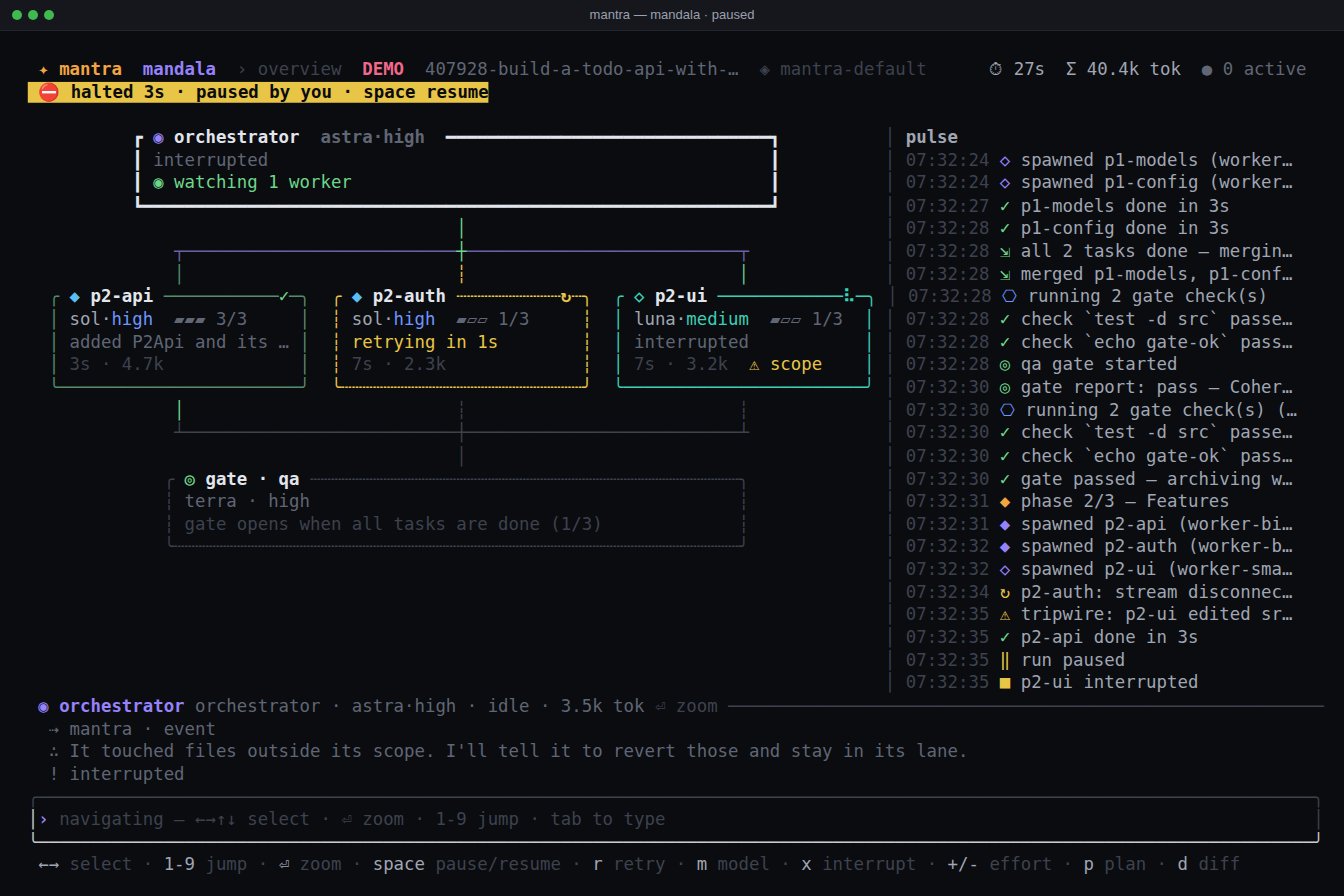
Watchdog ladder: idle 90 s → nudge · 240 s → respawn the orchestrator or wake it · twice that → wake the manager, then the planner · still nothing → halt, rather than pretend. A stop you make by hand (ctrl+c / x) outranks all of it. Chain of command: worker → orchestrator → planner (manager alongside) → you. Questions to you are a saffron band, not a halt.
06Models, providers, backends
An alias maps to a model and the runtime it goes through — via OpenAI (Codex) ◌, via Claude Code ✧ or via Bija •. ctrl+k switches the model for the focused agent, checked against that agent's actual backend first; the switch stays with that agent through respawns and resumes, and a message queued at the time is held and replayed; +/- adjust its context window; alt+↑/↓ the effort. /models edits the registry live: t tests a model for real, D discovers a provider's catalogue. A provider added with n is a draft until its URL and key are real — t and D stay off and the row says why (placeholder host, malformed URL, no key). A placeholder URL (example.com and the other RFC 2606 names) is refused by runs and mantra doctor too, so no key is ever sent there. A role asking for an effort its model does not offer gets the nearest one it has; when that is lower, the agent's transcript says so once and the overview shows requested→used. A role can also say effort = "auto" — mantra-default and the patterns built on it do (mantra-thorough names its efforts): Mantra picks per spawn, medium for planner, manager, orchestrator and gate, low for worker-small, medium for other workers, high for a finale step.
Any Responses-API provider works through Codex (Bija's providers are below). Add one in ~/.mantra/models.toml:
[[provider]]
id = "openrouter"
name = "OpenRouter"
base_url = "https://openrouter.ai/api/v1"
env_key = "OPENROUTER_API_KEY"       # or api_key = "…" stored 0600

[[model]]
alias = "luna-or"
provider = "openrouter"
model = "openai/gpt-5.6-luna"
context_window = 400000
efforts = ["low", "medium", "high"]
Claude Code as a backend: with claude on your PATH Mantra adds a claude provider (opus46, opus48, opus5, sonnet5, fable5, fable51 at a 1M context window, haiku45 at 200k). Point any role at it in the Studio, or use the built-in mantra-default-claude pattern. Third-party gateways: kind = "claude-code", auth = "api_key", a base URL and a key. Every agent is launched with an explicit context window and compaction threshold, so a 16k model compacts instead of dying — and never above the pattern's context_cap (200k in every built-in).
07Bija — the built-in harness
Bija (bīja, a seed — the smallest mantra there is) is Mantra's own agent harness: a small Rust binary, installed beside mantra, that turns any OpenAI-compatible Chat Completions API — or an Anthropic-compatible Messages API — into a coding agent: file tools, commands with a timeout or in the background, every retryable API error retried with backoff, every message on disk as it happens. No Node, no login: a key, or none for a local server.
Mantra ships a bija provider on the OpenAI API (OPENAI_API_KEY) with astra-api, sol-api, terra-api and luna-api — the Codex aliases' models, reached with a key instead of a Codex login — and a fresh install's Solo starts on sol-api. A models.toml from before Bija gets that provider and those aliases once, when it is loaded. mantra-default-bija is mantra-default with every role on an -api alias; mantra --demo --pattern mantra-default-bija runs it on the real binary against a mock API, no key needed. Anything else is a provider of your own — D discovers its models, and any role can use them:
[[provider]]
id = "local"
kind = "bija"
base_url = "http://127.0.0.1:11434/v1"   # Ollama, vLLM, a gateway, the OpenAI API…
wire = "openai"                          # or "anthropic" for a Messages API
env_key = "LOCAL_API_KEY"                # optional: a local server takes none
Each agent is one bija process speaking NDJSON over stdio, its session in ~/.mantra/bija/sessions/<id>/. Steering lands at the next tool boundary, x interrupts (and kills the running command's process group), a model or effort switch applies from the next request without a restart, and a crash resumes the session from its transcript — mid-turn, with the tool call it was in repaired. The sandbox decides where the file tools may write — nowhere (read-only), the agent's directory plus its writable roots and the temp dirs (workspace-write), or anywhere (danger-full-access) — and commands run inside bubblewrap where it works; where it doesn't they run unsandboxed, and the agent's log says so once. The key reaches bija only through its environment, and is removed from the environment of every command it runs.
Built for swarms. One thread, idle between events, a few MB of memory per agent — 40 idle bija processes measured at 4.7 MB each and no CPU. Quitting Mantra gives its Bija agents up to 3 s, together, to end their commands and close their transcripts.
On its own: bija run
bija run --provider-url … --model … "<prompt>"   # one turn; prints the final text
bija sessions                                    # list sessions, most recent first
bija show <id> -f                                # print a transcript and keep following it
bija send <id> "…"                               # prompt a session served with --control
Mantra's own agents are not served with --control; bija show <id> --home ~/.mantra/bija reads their transcripts. bija --help has the rest, and SPEC.md the protocol any orchestrator can drive it with.
08MCP servers & seeing the screen
Any stdio MCP server can be handed to agents on all three backends. Blender is the worked example: its MCP add-on runs inside Blender, and the server agents talk to is uvx blender-mcp. With Blender open and the add-on connected:
mantra mcp add blender -- uvx blender-mcp   # adds it to settings.toml, enabled
mantra mcp test blender                     # starts it, lists its tools, exits 0 or 1
mantra mcp                                  # every server: command, on or off, whether Solo gets it
Run test once after adding a server: it waits 20 s for an answer, and --timeout 120 gives a first uvx run, which downloads the server, the time it needs. add <name> [--env KEY=VALUE]… -- <command> [args…], remove, enable and disable do the rest — or write it into ~/.mantra/settings.toml yourself:
[mcp_servers.blender]       # any name: letters, digits, - and _
command = "uvx"
args = ["blender-mcp"]
env = { }                   # optional, added to the server's environment
enabled = true # false keeps the entry and never starts it- ›Who gets which. Solo gets what
solo_mcpnames — every enabled server by default (["*"]),[]for none;/mcpshows them and which ones the current Solo agent has, and/mcp solo <name|*|none>changes it for the next agent (/new). A Mandala role gets nothing unless its pattern says so:mcp = ["blender"]on the role (or["*"]), edited in the Studio. A role asking for a server that is not configured starts without it, and the journal says so once. - ›Per backend. Codex gets each server as
-c mcp_servers.<name>.…; Claude Code finds it beside Mantra's own server in--mcp-config; Bija gets anmcp.jsonin its session directory and starts every server with the session, again on a resume. Whichever backend, a call shows on the agent's card asblender.get_scene_info. Agents never pick up the MCP servers of your own Codex or Claude Code setup — only the ones you give them here (a Solo Claude agent given none keeps the ones you set up withclaude mcp add). - ›Mind the sandbox. A server runs as you, outside the agent's sandbox — a read-only role given a filesystem server can write through it — so give a role the servers its job needs and no more.
mantra --demobrings a stand-in (mantra mock-mcp) and gives it to every agent.
Seeing the screen
A model that takes images has vision on in /models (◉, ⏎ toggles it): a new models.toml has it on for the built-in aliases, D sets it when the provider's catalogue says so, and a models.toml from before 0.7.0 gets it switched on once for the built-in families. Its agents — and only theirs — get two tools that Mantra runs:
Nothing is captured unless the model calls the tool, and each capture costs context, so the tool tells it to look when it needs to and at a region when it knows where. Mantra captures with the first that works of grim, gnome-screenshot, scrot, ImageMagick's import and, on macOS, screencapture; MANTRA_SCREENSHOT_CMD replaces them with a command of your own. On Bija the model also gets Bija's own screenshot and view_image; images are kept as files under the session's images/, and a tool call that returned one shows ▣ image and the path on its card.
09Runs you can walk away from
mantra runs                        # title · project · stage · when · id
mantra runs resume 238330          # an id prefix is enough, from any directory
mantra runs delete 238330          # worktrees, branches and journal, after a y/N
mantra --resume-last               # this project's most recent unfinished run
A resume never replays what the old process was doing; it restarts at the nearest safe boundary — the planner re-attached to its thread, a fresh orchestrator briefed with the current status, workers re-attached when their worktree still exists, gates simply re-run (they are idempotent). Inside the app, /runs lists this project's runs.
A run has one owner. The Mantra that has a run open writes owner.json (pid, host, since) into the run's directory and removes it when the run ends or it quits cleanly. Resuming a run whose owner is still alive on this machine is refused — from /runs, the CLI, --resume-last and the web UI alike — because two processes driving one run would each save over the other's state. A dead owner is a crash, and resumes as usual; mantra runs resume <id> --take-over is for the rare case the check is wrong. --resume-last only ever picks a run of the project you are in.
A run has a title — the plan's title once the planner has submitted it, the goal's first six words before that. It leads the runs list, the TUI header and the web run header; the id stays the stable key and is shown second.
10Patterns & the Studio
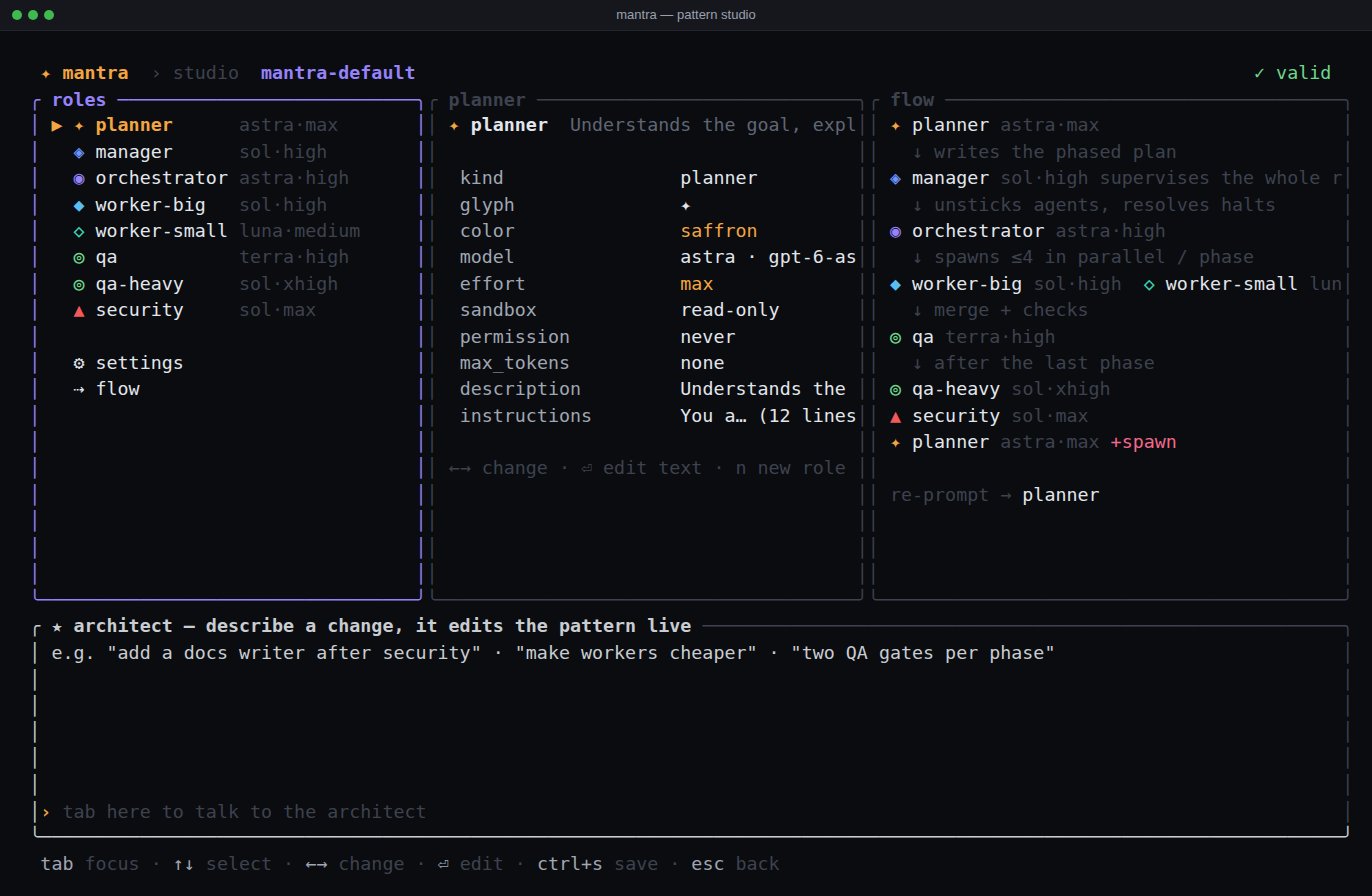
A pattern is the shape of a team: roles (kind, model, effort, sandbox, permission, instructions, an optional fallback model, the MCP servers it gets), settings (parallelism, retries, gate rounds, watchdog timeouts, review_minutes, manager_minutes, context_cap), groups and flow (who plans, manages, orchestrates, gates; the finale chain). A TOML file in ~/.mantra/patterns/; the Studio (s, /studio) edits all of it with live validation.
Every built-in sets context_cap = 200000: the context window each agent is told it has is the smaller of its model's window and this cap, so the backend compacts there instead of letting an agent cycle tools for hours. 0 is the model's full window; the Studio edits it. A repository with no commit yet gets an empty mantra: initial commit, so workers still get isolated worktrees.
Or tell the architect agent what you want and watch it edit the pattern: "add a docs writer after security", "make workers cheaper", "put the planner on Claude", "run without a manager" (flow.manager = "").
11Web UI & remote access
The same process that draws the TUI can also serve a small, installable web app for it — chat with every agent, approve or answer from your phone, watch the pulse feed, approve a plan — over plain HTTP on localhost, HTTPS on your LAN, or from anywhere through a relay that never sees a byte of it unencrypted. Nothing is bound and no cost is paid unless you ask for it.
mantra --web                                          # this machine only — http://127.0.0.1:7777
mantra --web 0.0.0.0:7777 --web-tls --web-password X  # your phone, on the LAN
mantra --remote                                       # from anywhere, end-to-end encrypted
mantra --headless --web --remote                      # the same, with no terminal at all
Starting it: --web
--web (optionally --web ADDR:PORT, or the explicit --web-listen ADDR:PORT) defaults to 127.0.0.1:7777 — loopback, no password needed, since anyone who can reach it can already run mantra itself. Bind anything else (--web 0.0.0.0:7777 for the LAN) and Mantra refuses to start without one: --web-password PW, the environment variable MANTRA_WEB_PASSWORD (preferred — flags show up in ps), or [web] password in settings.toml. The password rule follows the bind address, not who can actually reach it — port-forward a loopback listener out to the internet and the "no password" exemption comes along for the ride, so set one yourself before you do that. /web in the TUI shows the exact URL(s), whether TLS and a password are on, and how many browsers are connected right now.
HTTPS: --web-tls
Serves HTTPS with a small private certificate authority Mantra makes for itself the first time ($MANTRA_HOME/web/tls/), covering localhost, your LAN address and hostname, reissued — the leaf only, never the CA — only when those change or it is close to expiring. Install it once per device — from Settings › Certificate in the web UI (shown whenever Mantra serves its own certificate) or by fetching /cert.pem from the running server — and every certificate this Mantra ever issues for itself afterwards, even after your IP changes, is already trusted. --web-cert FILE --web-key FILE uses a certificate you already have instead. Without TLS the web UI still works on localhost, but a phone can't install it as an app or get notifications over plain HTTP.
Installing it as an app
Over HTTPS, Android/Chrome offers an Install button; on iPhone/iPad use Safari's Share › Add to Home Screen — iOS only delivers notifications to an installed app, and the UI says so once, in place. Either way you get a full-screen icon, offline shell caching, and a layout that respects the notch and the home indicator.
Roles & models. Settings → Roles & models lists every role in the running pattern with its model and effort; change one, or tick apply to all, and it is written straight back into the pattern file — the same file the Studio and ctrl+k edit.
Notifications
Once installed, Settings → Notifications turns on Web Push — implemented by hand, no third-party push service in the middle — for halts, questions, approvals, plan review, a finished run and a finished Solo turn, each toggle separate, with a Send a test button. Notifications need HTTPS. Subscriptions and push keys live in $MANTRA_HOME/web/push/, 0600; turn it off server-wide with [web] push = false.
--headless: no terminal at all
Runs the same engine with no terminal whatsoever — no raw mode, no input thread, nothing drawn — for a machine you only ever reach through the web UI or --remote. It needs at least one of --web/--remote (otherwise nothing would be reachable), and a password whenever --web is on — --web-password or MANTRA_WEB_PASSWORD, even on loopback, since a headless machine has nobody at the keyboard to notice a stranger on the port; --remote alone generates one. ctrl+c or SIGTERM shuts it down cleanly. The web URL prints to stderr at start; the relay's status follows it — waiting for the relay, connected, reconnected, each error once with its retry delay (again only when the text changes or after a minute) — and the link, code and password print once the relay has actually answered, never before.
[web] in settings.toml
Everything here is also a flag, and a flag always wins:
$MANTRA_HOME/web/ holds everything this needs — TLS certificate, push keys and subscriptions, sessions, the remote identity — each file 0600.
Remote access: --remote
--remote (optionally --remote wss://your-relay) dials out to a relay — wss://remote.mantra.codes by default — so the web UI reaches you from anywhere without opening a port on your machine or trusting the relay with anything: it only ever forwards ciphertext. /remote in the TUI shows the link, a QR code, a short code, and the password; r rotates the identity (the old link, code and QR stop working immediately).
- ›Link.
https://remote.mantra.codes/s/<sid>#k=<key>— the key lives only in the URL fragment, which browsers never send to a server; opening it derives the key and connects straight through. Self-hosting a relay on a different host than the site the link opens (--remote-site) makes the link carry an extra&r=wss://…pointing the browser back at that relay. - ›Code + password. The same session as a short code (grouped in dashes) typed in at remote.mantra.codes, plus the password — for reading aloud, or typing into a device you didn't get the link on.
- ›Password. Set your own, or let Mantra generate a four-word one the first time
--remoteruns (amber-kite-river-nine, from a fixed 256-word list). It also derives the link's key, so changing it — or rotating withr— invalidates old links and codes. - ›What the relay can and cannot see. Your host and the connecting browser derive a shared key from the password (PBKDF2, then a fresh HKDF key per connection) that never reaches the relay, and every message after that is AES-256-GCM end-to-end encrypted. It's a blind byte pipe: it sees your IP, the browser's IP, and encrypted bytes — never the password, the key, or anything your agents say, and it stores nothing on disk. A wrong password or code fails to decrypt the very first frame ("Wrong password or code") rather than quietly connecting into someone else's session.
- ›One hosted session per public IPv4.
remote.mantra.codesallows onemantra --remotesession per IPv4 address at a time — a second one dialing in from behind the same address (the same office, the same home network) is refused until the first disconnects, and Mantra reports that plainly instead of silently taking over. - ›A relay on its own host. The relay only forwards bytes; it doesn't have to be the same machine, or run by the same person, as whatever serves the page the link opens.
--remote-site URL(or[web] remote_site) points the link at that site explicitly; left unset, it defaults to the relay's own origin. Point--remoteat a relay you run yourself and Mantra never depends onremote.mantra.codesat all.
Behind a proxy
--remote dials the relay through the usual variables: https_proxy / HTTPS_PROXY for a wss:// relay, http_proxy / HTTP_PROXY for ws://, all_proxy for either (lowercase is read first), user:pass@ credentials included. no_proxy / NO_PROXY exempts hosts (*, a host or domain suffix, an IPv4 CIDR); a relay on localhost or a loopback address is never proxied, whatever the variables say. Only http:// proxies work — the relay is reached with HTTP CONNECT, TLS still runs end to end through the tunnel and the certificate is checked as usual; a socks5:// or https:// proxy URL is refused with a hint (use an http:// proxy, or no_proxy for the relay host). Behind a TLS-inspecting proxy, or with a self-hosted relay on a private CA, SSL_CERT_FILE adds a PEM bundle to the built-in roots — an untrusted relay certificate says so. Proxy failures are reported as the proxy's (refused the CONNECT (HTTP 403), cannot reach the proxy), not as a dead relay.
Slash commands: /web shows the listener, TLS/password state and connected browsers; /remote shows the link, QR, code and password — both from inside the running app.
12Keys & commands
ctrl+oswitch Solo ⇄ Mandala
ctrl+kmodel picker (←→ effort, +/- context)
alt+↑/↓raise / lower reasoning effort
ctrl+fforce-send a queued message · ctrl+x discard the queue
ctrl+ddiff viewer · ctrl+e verbose log
ctrl+tside panel / pulse · ctrl+g inbox
ctrl+rrespawn the focused agent
ctrl+cclose overlay / clear input / stop agent · ×3 quits
ctrl+lredraw · ? help
tabswitch typing ⇄ navigating
←→↑↓select an agent · 1–9 jump and zoom
⏎zoom in · esc back (never interrupts)
spacepause / resume the run
rrespawn · m switch model
xinterrupt · c compact · +/- effort
p a d splan · approve · diff · studio
@name …message one agent; plain text → planner
Slash commands: /model /effort /approvals /new /compact /diff /mandala /run /swarm /pattern /experimental /runs /plan /akasha /mcp /pause /respawn /land /studio /models /inbox /verbose /web /remote /help /quit — and !cmd runs a shell command. New in 0.7: /swarm N <goal> starts a swarm; /akasha [group] shows a run's shared notes; /experimental [akasha on|off] lists or switches experimental features; /mcp shows the MCP servers and /mcp solo <name|*|none> picks Solo's.
Command line
13Files & settings
Nothing is written into your project. A repo may ship patterns in <repo>/.mantra/patterns/, which Mantra reads but never creates. $MANTRA_HOME moves the lot.
settings.toml keys
Also there: default_model, default_pattern, approval_mode, sandbox, codex_command, claude_command, and for the terminal colors, glyphs, reduce_motion, mouse, fps, notify.
14Terminals & reporting a problem
kitty, WezTerm, Ghostty, Alacritty, iTerm2, Terminal.app, GNOME Terminal, Konsole, foot, tmux/screen, the Linux console. Colour depth is detected (truecolor → 256 → 16), glyphs fall back to ASCII. Minimum size 40×12. Windows is not supported.
# tmux — mantra doctor checks these
set -sg escape-time 10
set -g default-terminal "tmux-256color"
set -as terminal-features ",*:RGB"
set -g allow-passthrough on

# one file with everything useful; keys are redacted, nothing leaves your machine
curl -fsSL https://raw.githubusercontent.com/sahelea1/mantra/master/support-bundle.sh | sh > mantra-bundle.txt
Attach the bundle to an issue with what you did and what you expected.